



Loupedeck Live Photo/Video Editing & Streaming Console
- Used to Edit Video, Photos and Audio
- Native Integration with Compatible Software
- Control Live Streams, Browse Spotify
- Touchscreen LCD, Dials and Buttons
- Free Custom Profiles and Plug-Ins
- Use with Twitch, Streamlabs and OBS Studio
- Use with Adobe, FCP X and More
- Haptic Feedback
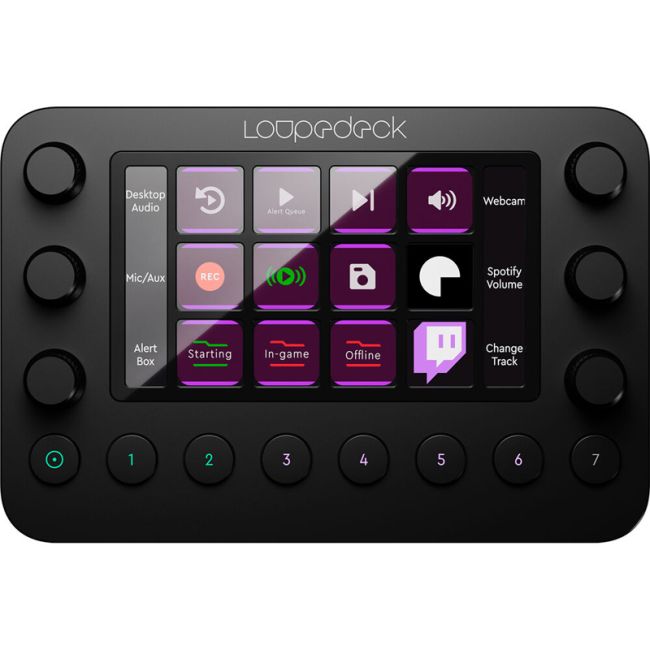
Get the professional Video, Photos and Audio editing within your hands with Loupedeck Live Photo/Video Editing & Streaming Console. It works as an extension of the keyboard, mouse, or tablet to provide efficient control and can be used via native integration with compatible software and is capable of controlling live streams and browse Spotify. It features touchscreen LCD, dials and buttons plus free custom profiles and plug-ins. The Loupedeck Live can be Use with Twitch, Streamlabs, OBS Studio and as well as Adobe, FCP X and many more.
Product Features in Detail
THE FUTURE OF LIVE CONTENT CREATION.
GET CREATIVE. GET INTUITIVE. GO LIVE!
Whether you’re producing photo or video content, controlling your live-streams, playing games, or browsing the web – Loupedeck Live is a powerful and customizable console designed to put tools and functions you need right at your fingertips.
Being a natural extension of your keyboard, mouse, graphic tablet and pen, Loupedeck Live streamlines your workflow to give you more time to focus on the things that matter – expressing your creativity and connecting with people.
With its seamless and intuitive controls, packed in a compact and portable premium shell, Loupedeck Live is designed to handle all of your needs – at the studio, on the go or in your home.
Equipped with deep native integrations to a wide range of creative and streaming tools and software, creating, composing, editing, and going live has never been this smooth.
CONTROLYOURSTREAM
YOUR STREAM. YOUR WAY.
Loupedeck Live is designed to deliver a powerful experience for live-streaming with deep integration to Twitch, Streamlabs, and OBS Studio. Arrange and customize all your actions using the console’s neat organization and go live in seconds, effortlessly switch scenes and sources, record gameplay, save replays. We want you to effortlessly create top-notch content while giving you time to chat with your audience.
SEAMLESS COMPATIBILITY WITH YOUR SOFTWARE
Included with the purchase of Loupedeck Live:
All creative plugins
All live-streaming plugins
Unlimited Custom Profiles
LIVE-STREAMING:
STREAMLABS AND OBS STUDIO
TWITCH
CREATIVE
ADOBE LIGHTROOM CLASSIC:
ADOBE PHOTOSHOP CC
ADOBE PREMIERE PRO CC
FINAL CUT PRO X
ADOBE ILLUSTRATOR
ABLETON® LIVE™
ADOBE AUDITION
ADOBE AFTER EFFECTS CC
GENERAL:
SPOTIFY
CUSTOM PROFILES
OPERATING SYSTEM CONTROL
WITH ANY SOFTWARE
Custom Profiles can be built within the Loupedeck Software, and allow you to use your device in any application you wish.
| OPERATING SYSTEM | Win 10, Mac 10.13 or higher |
| SUPPORTED SOFTWARE* | Streamlabs OBS |
| OBS Studio | |
| Spotify | |
| Twitch | |
| Adobe Lightroom Classic | |
| Adobe Photoshop CC | |
| Adobe Premiere Pro CC | |
| Adobe After Effects CC | |
| Adobe Audition CC | |
| Final Cut Pro X | |
| Adobe Illustrator CC | |
| *Loupedeck’s native plugins always support the latest version of the applications. | |
| Note! Lightroom 6 is not supported by Loupedeck CT or Loupedeck Live. | |
| LOUPEDECK LIVE SPECIFICATIONS | Display: 4.3-inch 480×272 pixel LCD with capacitive touch panel |
| Buttons: 8 round shape push-buttons with RGB backlight | |
| Rotation encoders: 6 endless rotation encoders with detents and push-button | |
| Dimensions: 150x110x30mm Weight: 230g |
USB Type-C Cable
USB Type-C to USB Type-A Adapter
Stand for Loupedeck Live

