



BirdDog Control Surface with MAKI Studio App
- Six-Input Hardware Controller
- Tactile Broadcast-Style Control
- Portable MAKI Live Multicamera Solution
- Integrated T-Bar and Rolling Scroll Wheel
- Visual Monitoring via Optional iPad
- AI-Enhanced Creativity
- For Content Creators and Educators
- On-Air Indicator
- Powered via USB-C Port
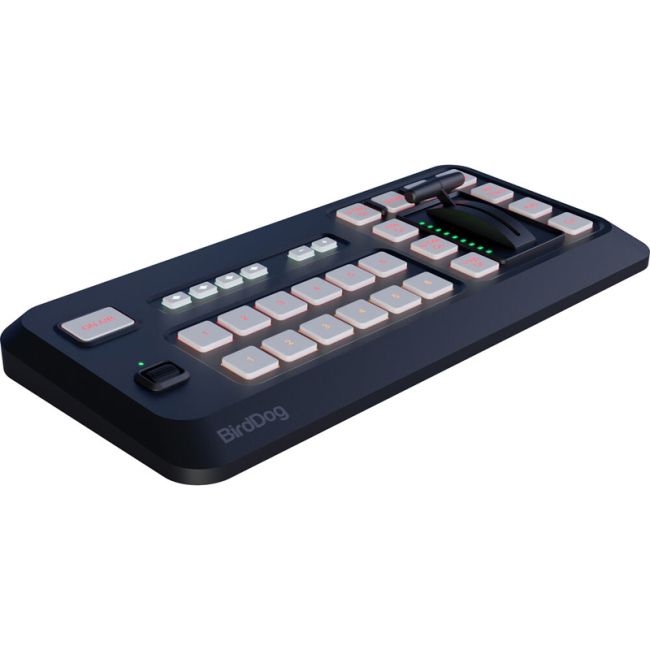
The BirdDog Control Surface with MAKI Studio App provides a powerful and portable solution for multicamera control and live production. It can manage up to six inputs seamlessly, ideal for multicamera setups in live production environments. It offers a tactile interface tailored for professional workflows with features like an integrated T-Bar and a rolling scroll wheel for precise adjustments. The portable MAKI Live Multicamera Solution i compact and lightweight for on-the-go production, making it perfect for mobile studios. You can connect an iPad to enhance visual monitoring for multiview setups and camera oversight. The BirdDog Control Surface with MAKI Studio App leverages AI for creative enhancements, streamlining workflows and improving production quality. Ideal for content creators and educators, providing an intuitive and advanced tool for live streaming, teaching, and professional broadcasting. Built-in indicator ensures clear visibility of live status, crucial for professional environments. Powered via a USB-C port, it simplifies connectivity and power requirements. This versatile control surface is a game-changer for multicamera live production, offering precise control, portability, and innovative AI features. Perfect for classroom teaching, professional broadcasts, or creative content creation, it elevates your production quality with cutting-edge technology.
Product Features in Detail
MAKI Studio Control Surface. Command Your Live Productions.
The MAKI Studio Control Surface is designed to provide tactile, professional-grade control over your live productions. Its intuitive layout and responsive controls allow for seamless multi-camera switching, precise transitions, and efficient media management.
The MAKI Studio App can be downloaded to your iPad to enhance your workflow, offering a visual interface for configuration and monitoring.
Please note, Control Surface required for app to function.
Usage Note: The MAKI Studio App is intended to complement the Control Surface, providing additional functionality and a tactile interface. It is not designed to operate as a standalone application.
Pro Control in Your Hands.
The MAKI Studio Control Surface and iPad app work together to deliver fast, seamless live production.
No computer needed.
On-Board Buttons.
The MAKI Control Surface provides tactile, pro-level switching, while the iPad app gives you an intuitive interface for monitoring and setup.
Multi-Camera Switching with Low Latency.
Effortlessly switch between multiple MAKI Live or NDI® cameras in real-time with near-zero delay for smooth, professional transitions.
NDI® & Wireless Flexibility.
Connect cameras via WiFi or Ethernet, eliminating the need for bulky cables while keeping your setup clean and mobile.
Picture-in-Picture & Media Playback.
Add dynamic multi-angle views and play back videos, images, and graphics to enhance storytelling.
Title Overlays & Advanced Transitions.
Customize text, captions, and lower thirds in real-time while using broadcast-quality effects like stingers and fades for a polished look.
NDI® Output for Maximum Flexibility.
Supports both High Bandwidth NDI & NDI|HX, ensuring low-latency, high-quality video in any workflow.
Go Live or Record for Later.
Stream to YouTube, Facebook Live, or Vimeo, or record high-quality content directly to your iPad.
On-board Buttons.
Use the touchscreen interface for easy operation or the MAKI Control Surface for precision camera switching and scene transitions.
Let Your Digits Take Control.
Optimized for MAKI Live, but also compatible with any NDI-enabled camera, including BirdDog X Series.
| Bluetooth Control Surface | |
| Source Select Buttons | 6 Program, 6 Preview |
| Transition Controller | T-Bar |
| Dedicated Effects Buttons | Cut/Auto-transition/PIP-transition/T-Bar PIP Control |
| Dedicated Video Overlay Buttons | Stinger transition/Title/Network Title/Bug Logo |
| Audio Preset | 4x Recall Banks |
| Scroll Wheel | Vertical nagivation control wheel |
| Power Input | USB-C Input |
| Power Output | USB-C Output |
| Bluetooth | Bluetooth-LE |
| MAKI Studio Application | |
| NDI Support | NDI® | HX & High Bandwidth NDI® inputs |
| Inbuilt Camera | Supports on-board and UVC Web Cameras as addiitonal sources |
| No. of live inputs | Up to 10 (iPad/iPhone processor dependent) |
| Local Video Output | Apple Airplay/Native HDMI output/NDI | HX®/High Bandwidth NDI® |
| Streaming Output | Direct Facebook Live, RTMP/RTMPS output |
| Streaming Output Quality | Selectable - 3Mbps ~ 9Mbps |
| Streaming Resolution Support | 428x240 ~ 1920 x 1080 |
| No. of concurrent streaming destinations | 3 |
| Title formats | Inbuilt Titler, HTML5, NDI with Transparency |
| GENERAL | |
| Operating System | iOS 15 or later |
| Platform Support | iPhone, iPad, MacOS Limited support |
| Licensing | Software downloadable from App store free or charge, Bluetooth Control Surface required to launch app |
This product comes with 12 Months Australian Manufacturer Warranty. Our products are sourced from authorised Australian suppliers and therefore come with genuine Australian warranty. Camera Warehouse does not participate in 'Grey Market' or 'Parallel Import' activities.
BirdDog Control Surface with MAKI Studio App

SKU: BirdDog BDMK-CS
UPC: 9354873001352
